
The IBM Security Cost of a Data Breach Report 2024 states the global cost average of a data breach reached $4.88 million with public cloud data breaches global averaging $4.88 million – the most expensive environment to breach, In this complete Article we’ll cover about 15 Cloud Security Tips & Best Practices that Actually Prevent Breaches in 2026.
The majority are not even considered sophisticated breaches. The majority of cloud breaches can be attributed to the same security gaps such as lacking proper controls, misconfigurations, or leaving IAM permissions too broad and/or disabling MFA.
We provide 15 cloud security best practices as guidance from NIST, CISA, OWASP, MITRE ATT&CK, CIS and IBM Security. They are organized into 6 pillars: Identity & Access Management, Data Protection, Network Security, Threat Detection & Incident Response, Compliance & Governance, and DevSecOps.
We hope that whether you are starting a new cloud security program or improving the cloud security program you currently have, each tip provides practical ways to help you get started.

Why Cloud Security Best Practices Matter More Than Ever in 2026
Here’s what makes cloud security so difficult to get right: the failures aren’t dramatic. They accumulate.
Improving a system in the short term can have long-term effects. Take the decision to assign admin access to a service account to expedite a task. During a test, access permissions were assigned to a storage bucket, and the change was not reverted. A Multi-Factor Authentication (MFA) policy was enforced for all human users, but service principals were excluded. At the time, none of these changes would have been considered a security issue. However, the cumulative effect of these changes can result in limited security for several accounts.
In March 7, 2024, the NSA published the “Top Ten Cloud Security Mitigation Strategies” and stated clearly, “Many cloud breaches occur due to misconfigurations in cloud tenants.” The NSA/CISA joint advisory, AA23-278A, identified persistent operational gaps from misconfigurations and inconsistently applied MFA. Novel exploits were not the cause of the breaches.
With the Shared Responsibility Model, all of the underlying infrastructure of the cloud (hardware, hypervisors, and the global cloud network) is secured by the provider. The infrastructure built on top of it, systems, applications, data, identities, and access, is your responsibility. Breach exposure exists at the boundary of the provider’s compliance certification and your workload.

There’s one more pressure that’s changed the calculus recently, threat actors can leverage AI to automate reconnaissance, and, at a level never before reached by a manual attacker, conduct more sophisticated phishing and credential-stuffing campaigns targeting cloud administrators. If your organization views cloud security like a checklist item – a one and done that only needs an annual review – expect your organization to lag in a rapidly evolving threat landscape.
Best practices in cloud security need to address the ongoing gaps and rapid changes in the threat landscape.
Identity & Access Management Cloud Security Best Practices
Every cloud security incident brings you to the same ultimate question: who had access and why?

Identity and access management helps you answer this question proactively, rather than waiting for a cloud security incident to occur. When IAM fails, all remaining parts of your cloud security will soon follow. It does not help to have a well-designed and perfect server cloud if you have an IAM system in which service accounts have excessive permissions (stolen credentials).
Tip 1: Enforce MFA on Every Privileged Account
The first thing that should be checked in any cloud system is if Multi-Factor Authentication (MFA) is enforced for privileged accounts. This means that MFA should be enforced for access to both the console and APIs. Many organizations leave critical accounts without MFA.
CIS Controls v8 recommends MFA for all privileged accounts. MFA should be enforced for accounts that can manage IAM, access production systems, or provision resources in the cloud. MFA should be enforced for these accounts even if there is no documented risk acceptance.
There has been a rise in MFA fatigue attacks since the Uber breach in 2022. Due to this, not all MFA solutions should be treated the same way. FIDO2 hardware security keys, such as YubiKey or Google Titan, avoid these fatigue attacks by providing phishing-resistant authentication.
MFA should be enforced through your identity provider, such as AWS IAM, Azure Conditional Access, or GCP Organization Policy. Any exceptions should be treated through a formal risk management process.
Tip 2: Adopt Least-Privilege Access with Time-Bound Entitlements
A common finding in cloud security assessments is overprivileged accounts users and service accounts with far more access than they actually need. This includes users and service accounts with more access than necessary. NIST SP 800-53 AC-6 (Least Privilege) recommends the idea of implementing the minimum permissions required for each role, reducing the impact of compromised credentials
Privileges (permissions) accumulate over time. Developers are made administrators for a temporary function and service accounts become more privileged long after the service has been finished. This means a higher risk of account compromise and subsequently a higher risk for the company.
Just-in-Time (JIT) access establishes a means to counter this problem. This allows privileged access for a temporary time period. After the function is performed, the privilege level is automatically returned to the previous state. Azure Privileged Identity Management (PIM) and AWS IAM Identity Center implement JIT access through the use of approval requests and logs.
An initial goal should be the review of all Administrative and Owner roles that are assigned permanently. These roles should be reassigned to temporary roles with the lowest privileges necessary, to the greatest extent possible.
Tip 3: Implement Zero Trust Architecture for Cloud Workloads
Zero Trust means no user, device, or workload is trusted by default. Trust is never assumed, and access requests are fully authenticated based on the identity, posture, and context of the device/request. Access permissions are the bare minimum needed to fulfill the request.
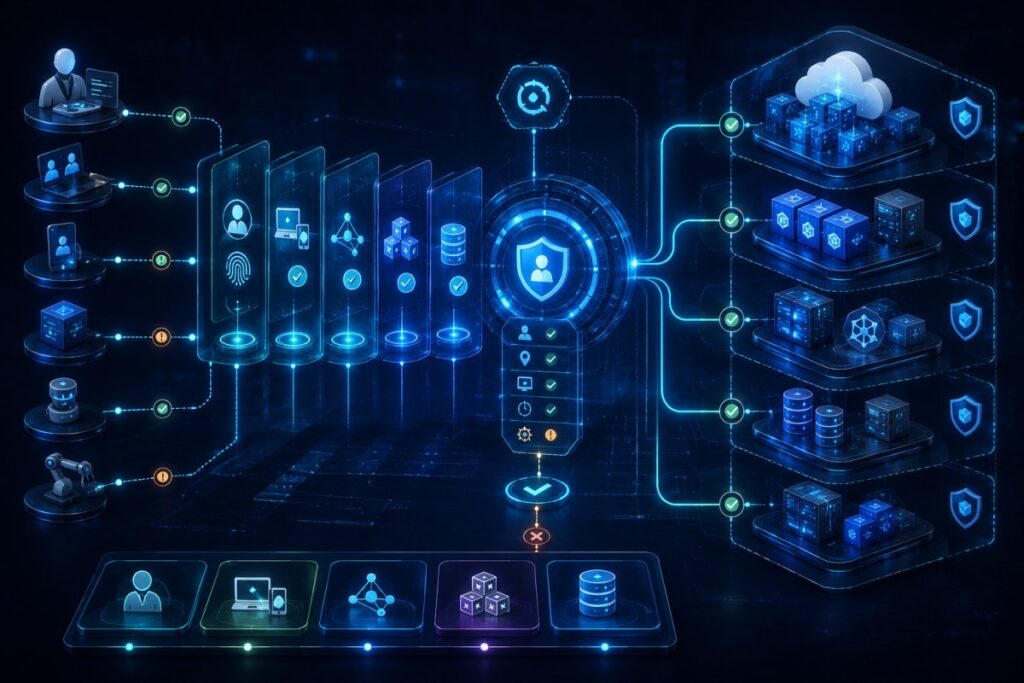
In the past perimeter-based security systems fulfilled their intended purpose as long as the traffic was internal. With the current state of cloud security systems, this trust is an unnecessary risk. Users can connect from anywhere. Workloads communicate via APIs, and third-party vendors access your cloud resources.
The NSA Zero Trust Model recommends implementing security in the following five pillars: identity, devices, networks, applications, and data. Trust is never assumed. Requests made from one cloud service to another should be authenticated. Using AWS IAM Roles, Azure Managed Identities, or Google Cloud Workload Identity helps to enforce this. Application policies should also limit the permissions of the resources in the application to prevent lateral movements within the application and reduce the scope of the breach further.
Tip 4: Classify Data Before It Reaches the Cloud
Classify each data asset according to its sensitivity before migrating workloads. Data classification is often neglected, but it forms the foundation for the implementation of adequate security and compliance controls.
According to the CSA Cloud Controls Matrix v4.1, data should be classified prior to deployment to help the organization decide the means of encryption, access controls, and which regulations may be applicable. Grouping data into public, internal-use, and confidential/regulated categories is the minimum classification effort.

Create a comprehensive data inventory and classification, and assign ownership to each data asset. Utilize the tagging tools of the cloud service provider to enforce security policies consistently. Without data classification, the enforcement of security policies such as encryption and access control becomes inconsistent and burdensome.
Tip 5: Enforce Encryption in Transit and at Rest with Customer-Managed Keys
When it comes to cloud providers, data encryption at rest has become a standard practice many teams have gotten used to. A better question to follow up with is: who holds the encrypting keys?
The providers encryption solution protects data at rest encrypts data and holds the encrypting keys. What happens if you need to utilize your data at a certain point and decompression is required? What if you need to revoke access during an audit, a request to prove data soveriegnty, or during a data breach to help mitigate the damage?
It is completely up to the provider, their tools, and how quickly they respond to serve you. Customer Managed Keys (CMK) through AWS Key Management Service (KMS), Azure Key Vault, and GCP Cloud KMS shifts the power dynamic. With CMK, the key lifecycle is now owned and controlled by the customer. Once a key is revoked, access across all data is also revoked. This is done through all the services that reference that key, without the need to go through each individual IAM policy to remove them.
TLS 1.2 must be the minimum standard in all service-to-service communications and API calls. TLS 1.3 is preferred where applicable. Also, ensure all legacy protocols are disabled in the load balancer and API Gateway. Teams that focus on the application and forget the layers that sit on top of it leave open gaps.
Tip 6: Deploy DLP Policies Tuned to Cloud Storage Patterns
Data Loss Prevention (DLP), in plain terms: DLP is a set of policies and automated controls that detect sensitive data – credit card numbers, Social Security numbers, protected health information and block or alert on actions that would expose it inappropriately, such as uploading a confidential file to a public S3 bucket.
Most organizations bring DLP from their on-premises environment. DLP controls at this level were designed to control endpoints, blocking USB transfers and flagging email attachments as sensitive. These policies do not translate to the cloud and, due to the nature of exposure, do not touch on the cloud storage.
In a cloud environment, data loss prevention policies exposed data through the creation of links with poor bucket permissions or the use of APIs to integrate with 3rd party services, thus mirroring data. Endpoint DLP policies are exposed to this.
AWS Macie and Google Cloud DLP (now Sensitive Data Protection) both use machine learning within their platforms to provide Data Loss Prevention, protection and advanced data classification. Both tools integrate with cloud platforms’ native Identity and Access Management (IAM) and logging.
Based on the previous Tip 4, adjust DLP policies based on the classification levels. The sensitivity level of a storage object defines which policies are to be enforced. Regulated data gets the strictest treatment: block public access, require customer-managed keys, alert on any external sharing event.
Tip 7: Segment Cloud Workloads with Micro-Segmentation and VPC/VNET Policies
Micro-segmentation produces a number of isolated zones in a cloud environment. This way, if a workload is breached, attackers will have the same limitations that the rest of the environment does. All application tiers can communicate with just about everything, but zones and micro-segmentation policies will remain intact.
Flat networks are a common vulnerability in cloud security. Permissive security rules mean that if one workload is compromised, the entire cloud environment will fall under the same threat.

In AWS, creating multiple security groups and networks along with the multiple layers of authorized security rules is required. The same applies for Azure. Security restrictions mean you will have to provide access to subnets across both the public and the application subnets while denying access to the other. Similarly, the access to the databases must be tightly controlled to permit just what is necessary.
Reduced lateral movement, decreased unintended impact across the environment, and enhanced security become the natural side effect of all these techniques combined.
Tip 8: Restrict Outbound Egress and Monitor DNS for C2 Detection
Command and Control (C2) refers to the means by which an attacker can communicate with a compromised cloud workload, and give instructions to that workload in order to exfiltrate data. Making it more difficult for attackers to establish that communication can be accomplished by restricting outbound network traffic and logging and monitoring DNS requests.
DNS tunneling, HTTPS beaconing, and other C2 methods rely on outbound communication, and are therefore susceptible to a deny-by-default egress policy. Such a policy can be Effected using AWS Security Groups, Azure NSG, and GCP Firewall policies, and should allow only those outbound communications that are absolutely necessary.
VPC Flow Logs, NSG Flow Logs, along with DNS query logs should be consolidated in a central SIEM. Outbound threat traffic correlated to threat intelligence can provide an additional defense in depth strategy by detecting and preventing requests to malicious domains.
Tip 9: Use WAF Rules Aligned to OWASP Top 10 for Cloud-Hosted APIs
Injection attacks, broken authentication, and security misconfigurations are a few examples of what is covered by the OWASP Top 10 in the most common threats related to web apps and APIs. Malicious requests can be mitigated by configuring a WAF to these threats.
The cloud solutions AWS WAF, Azure WAF, and GCP Cloud Armor, provide managed OWASP rule sets to protect web apps from APIs and cloud based attack patterns.
Managed rules should be complemented with custom policies tailored to your APIs, such as restricting HTTP methods, validating headers, and applying rate limits. Start in detection mode, review false positives, then switch to enforcement mode while logging all blocked requests for monitoring and incident investigations.
Tip 10: Enable Cloud-Native SIEM Integration
SIEM, in simple terms, collects logs from across your cloud environment, normalizes them, and correlates events to detect threats that individual tools might miss.
With traditional methods, many incidents go unnoticed due to the segregation/disjointed structures of identity and access logs on different consoles. Further, a suspicious login, along with irregular API calls and abnormal network traffic, can each be unthreatening, but when consolidated, can indicate an attack.
Event integration tools such as AWS CloudTrail, GuardDuty, VPC Flow Logs, Microsoft Sentinel, and Google Cloud Chronicle into a unified SIEM. SIEM improves investigations, provides security teams with quicker and more relevant data and analytics, and helps identify multi-stage attacks much earlier.
Tip 11: Instrument AI/ML-Based Anomaly Detection for Cloud Workloads
Signature-based methods rely on identifying known threats. Therefore, attackers who deploy legitimate APIs or use stolen credentials are not detected. Instead, AI/ML-based anomaly detection relies on how users, workloads, and APIs behave normally. Out of the behavioral patterns, AI/ML can spot anomalies and trigger alerts that warrant investigation.
Amazon GuardDuty and Microsoft Defender for Cloud are examples of tools that use AI and ML to observe and interpret user access behaviour, network interactions, and API calls. Due to their approach, they are more likely to identify threats than signature-based detection.

To reduce false positives, tune detection policies, suppress expected changes during migrations or deployments, and route alerts to a centralized SIEM. When combined with structured incident response, AI-driven anomaly detection provides an essential layer of cloud security beyond traditional signature-based defenses.
Tip 12: Define and Test a Cloud-Specific Incident Response Runbook
An incident response plan will have a list of whom to contact. A cloud-specific runbook goes a step further and details the procedures for isolating the infected resources, revoking access, and evidence collection, while also enabling automated containment.
NIST SP 800-61 focuses on the idea of preparedness and describes how in cloud computing, containers, serverless functions, and auto-scaling instances can disappear within minutes, taking with them precious forensic evidence. Thus, your runbook must include containment, evidence collection, and credential revocation, along with the cloud-native tools that aid the described steps.

Develop steps for the incidents that you are most likely to encounter. Some examples include the compromise of IAM credentials, exposure of publicly accessible storage, ransomware, and attacking containers. Each step must be clear with respect to the intent of detecting and containing the threat with no confusion.
Above all, ensure to keep the runbook up to date with frequent use. A runbook that has not been put to use is the same as a document that holds a plan for no incidents.
Tip 13: Map Controls to a Recognized Framework Before Choosing Cloud Services
Security should not be treated as an afterthought when migrating to the cloud. It should be a priority when developing a cloud strategy.
Setting security requirements with the NIST Cybersecurity Framework version 2.0 may assist in defining the security outcomes and CIS Benchmarks may assist in determining secure configurations on AWS, Azure and GCP. Employing these frameworks may assist in meeting security and compliance requirements when utilizing cloud services.
Develop a control mapping matrix to compare the controls of potential cloud services. Identify configuration requirements and the gaps. It is less challenging to design security into a system rather than to try and patch security gaps after the system has been implemented.
Tip 14: Automate Continuous Compliance Scanning with Cloud-Native Tools
Traditional audits done with a specific focus in time become quickly outdated in the cloud due to constant changes. A compliance gap may be created by new cloud resources, updates to existing resources, and changes to permissions. Continuous compliance monitoring will help with identifying these gaps.

Cloud security posture management (CSPM) is the practice of ensuring compliance with security standards. CSPM provides organizations the ability to manage security in the cloud between audits. CSPM continuously monitors cloud resources and security policies, identifies violations, and assists in automating corrections.
Tip 15: Conduct Regular Third-Party Cloud Security Assessments
Internal teams know their environments well, but that familiarity can create blind spots. Temporary permissions, outdated configurations, and long-standing assumptions often go unnoticed. An independent assessor reviews the environment with a fresh perspective, identifying risks that internal teams may overlook.
Misconfigured IAM trust relationships, excessive permissions, exposed storage, and security gaps are routinely misconfigured trust relationships and security gaps that internal monitoring cannot identify.
Conduct a cloud security assessment at least once a year, and after major architectural changes such as cloud migrations, identity redesigns, or new service deployments. As cloud environments evolve, regular independent reviews help ensure security controls remain effective.
Quick-Reference Summary: All 15 Cloud Security Tips at a Glance
The table below maps all 15 cloud security best practices to their pillar and the primary role responsible for implementation. Use it to build a role-specific action list or assign ownership across teams.
| Tip # | Cloud Security Best Practice | Pillar | Primary Role |
|---|---|---|---|
| 1 | Enforce MFA on Every Privileged Account | Identity & Access Management | CISO / IT Director |
| 2 | Adopt Least-Privilege Access with Time-Bound Entitlements | Identity & Access Management | Security Architect |
| 3 | Implement Zero Trust Architecture for Cloud Workloads | Identity & Access Management | CISO / Security Architect |
| 4 | Classify Data Before It Reaches the Cloud | Data Protection & Encryption | Compliance Officer |
| 5 | Enforce Encryption in Transit and at Rest with Customer-Managed Keys | Data Protection & Encryption | Cloud Engineer |
| 6 | Deploy DLP Policies Tuned to Cloud Storage Patterns | Data Protection & Encryption | Compliance Officer |
| 7 | Segment Cloud Workloads with Micro-Segmentation and VPC/VNET Policies | Network Security | Cloud Engineer |
| 8 | Restrict Outbound Egress and Monitor DNS for C2 Detection | Network Security | Security Architect |
| 9 | Use WAF Rules Aligned to OWASP Top 10 for Cloud-Hosted APIs | Network Security | Cloud Engineer / DevOps |
| 10 | Enable Cloud-Native SIEM Integration | Threat Detection & IR | Security Analyst |
| 11 | Instrument AI/ML-Based Anomaly Detection for Cloud Workloads | Threat Detection & IR | Security Architect |
| 12 | Define and Test a Cloud-Specific Incident Response Runbook | Threat Detection & IR | CISO / IT Director |
| 13 | Map Controls to a Recognized Framework Before Choosing Cloud Services | Compliance & Governance | CISO / Compliance Officer |
| 14 | Automate Continuous Compliance Scanning with Cloud-Native Tools | Compliance & Governance | Cloud Administrator |
| 15 | Conduct Regular Third-Party Cloud Security Assessments | Compliance & Governance | CISO / SMB Owner |
Work With Avancercorp
Translating a checklist into an organization-specific security posture is where the real work begins. Avancercorp’s cloud security assessment services help organizations map their current cloud configurations against the frameworks and controls covered in this article – identifying which gaps carry the highest remediation priority and which controls are already in better shape than teams realize.
If any of the scenarios in this article sounded familiar, that’s usually where the conversation starts. Whether you want to begin with a targeted review of a specific pillar or a full-scope independent assessment, both paths are available at whatever pace fits your organization’s current priorities.
Common Cloud Security Mistakes to Avoid
Avoid these common mistakes that often lead to cloud security incidents:
- Misunderstanding the Shared Responsibility Model: Cloud providers secure the infrastructure, but customers must protect their data, identities, and applications.
- Storing Secrets in Environment Variables: Use secure secret management tools like AWS Secrets Manager, Azure Key Vault, or HashiCorp Vault instead of plaintext environment variables.
- Treating Security as a One-Time Audit: Cloud environments change constantly, so continuous monitoring is essential.
- Granting Excessive IAM Permissions: Apply least-privilege access and use time-bound permissions to reduce risk.
- Skipping Incident Response Testing: Regularly test your incident response plan with tabletop exercises and simulations.
- Assuming SaaS Providers Handle Everything: Even with SaaS, customers remain responsible for identity security, MFA, and access management.
- Leaving Default Configurations Unchanged: Harden default settings using CIS Benchmarks and Infrastructure-as-Code (IaC) policies to prevent misconfigurations.
Cloud Security Checklist
Use this checklist to verify key cloud security controls. Mark each item complete only after confirming the configuration.
Identity & Access Management
- [✓] Enable MFA for all cloud accounts, prioritizing FIDO2 keys for privileged users.
- [✓] Replace permanent admin roles with just-in-time (JIT) access.
- [✓] Apply least-privilege IAM policies to users and service accounts.
- [✓] Enforce Zero Trust for workload and service-to-service access.
Data Protection & Encryption
- [✓] Classify data before moving it to the cloud.
- [✓] Use customer-managed keys for sensitive data encryption.
- [✓] Enforce TLS 1.2+ for all data in transit.
- [✓] Deploy DLP policies to protect sensitive cloud data.
Network Security
- [✓] Segment workloads into isolated subnets.
- [✓] Restrict outbound traffic with deny-by-default firewall rules.
- [✓] Enable DNS logging for threat detection.
- [✓] Protect public applications with an OWASP-aligned WAF.
Threat Detection & Incident Response
- [✓] Enable cloud-native threat detection tools.
- [✓] Centralize cloud logs in a SIEM platform.
- [✓] Regularly test your cloud incident response runbook.
Compliance & Governance
- [✓] Map configurations to CIS Benchmarks and security frameworks.
- [✓] Enable continuous compliance monitoring.
- [✓] Conduct annual third-party security assessments.
DevSecOps
- [✓] Integrate SAST and dependency scanning into CI/CD pipelines.
- [✓] Scan and sign container images before deployment.
- [✓] Generate and maintain an SBOM for every release.
Tool & Framework Spotlight
The options below are among the most widely used across key cloud security domains. The right choice depends on your cloud environment, existing tools, and security requirements.
CSPM:
Wiz provides agentless multi-cloud visibility and attack path analysis. Prisma Cloud offers advanced enterprise policy management, while AWS Security Hub centralizes security findings for AWS environments.
Identity / PAM:
CyberArk secures privileged accounts with vaulting and session monitoring. BeyondTrust focuses on credential discovery and JIT access, while Azure PIM delivers native JIT role management for Microsoft Entra ID.
CI/CD Security:
Snyk scans code and dependencies within developer workflows. Trivy is a lightweight open-source scanner for containers and IaC, while Checkov validates Terraform, CloudFormation, and Kubernetes configurations against security policies.
Frameworks:
NIST CSF 2.0 provides a comprehensive cybersecurity framework. CIS Benchmarks offer secure cloud configuration standards, CSA CCM supports cloud compliance mapping, and MITRE ATT&CK for Cloud helps model threats and strengthen detections.
Real-World Cloud Security Breaches & Lessons Learned
These real-world breaches highlight common cloud security failures and the controls that could have prevented them.
Capital One (2019)
- Cloud Service: AWS (EC2 + S3)
- Root Cause: A misconfigured WAF and overly permissive IAM role allowed attackers to access sensitive S3 data through an SSRF attack.
- Business Impact: 106 million customer records exposed, resulting in major fines and legal settlements.
- Lesson: Enforce least-privilege IAM policies and enable IMDSv2 to reduce credential theft risks.
Uber (2022)
- Cloud Service: AWS and internal systems
- Root Cause: Stolen credentials, MFA fatigue, and hard-coded admin credentials led to widespread access.
- Business Impact: Attackers compromised internal systems, code repositories, and security tools.
- Lesson: Use phishing-resistant FIDO2 MFA, remove hard-coded credentials, and enforce PAM with step-up authentication.
Snowflake Customer Breaches (2024)
- Cloud Service: Snowflake (SaaS)
- Root Cause: Attackers used stolen credentials to access customer accounts without MFA.
- Business Impact: More than 160 organizations were affected, exposing millions of customer records.
- Lesson: Enforce MFA for all cloud accounts and continuously monitor login activity for suspicious behavior.
Cloud Security Best Practices: SMBs vs. Enterprise
There are significant variations in cloud security challenges for a business with one cloud account versus one with multiple accounts. While their budgets, teams, and complexities will be different, similarly, so will the threats.
All organizations face credential theft, misconfigurations, and deficient access controls. What separates organizations are their solutions.
For small to medium business (SMB) cloud security, solutions should focus on value and affordability. Implement MFA for all accounts. Employ cloud service provider (CSP) tools to identify misconfigurations and consider a managed security service provider (MSSP) for 24/7 security monitoring.

For large businesses, the focus is on security at scale. Use the NIST Cybersecurity Framework (CSF) and the Center for Internet Security (CIS) Benchmarks for Governance, Centralized Identity and controlled access (including Just-in-Time or JIT privileges), and assess the security of your supply chain by using red team adversarial security assessments.
For any organization, the basics don’t change. Implement MFA, least privilege, perpetual monitoring, and a Zero Trust architecture. The goal with all of these is to limit the impact of a security breach.
Conclusion: Treat Cloud Security as an Ongoing Process
Cloud security is an ongoing process that cannot be stopped or paused. New threats and changes to cloud environments will always exist, meaning that security needs to be updated and refined on an ongoing basis. To have a strong security posture, you need to have an ongoing commitment towards making security an operational activity instead of a goal.
The 15 best practices outlined here aim to strengthen security measures across identity and data protection, networks, threats, compliance, and DevSecOps. The essential needs of these measures include reviews, monitoring, and improvements.
Organizations with consistent cloud security that reliably identifies and mitigates threats don’t necessarily have the largest budgets. Responding to the cloud security threats that exist is a more important commitment than a monetary commitment. Here, consistent security measures are more critical than the best tools.
Frequently Asked Questions About Cloud Security Best Practices:
What is the most critical cloud security risk organizations face today?
Cloud misconfiguration remains the biggest risk. Overly permissive IAM policies, public storage, and insecure default settings cause more cloud breaches than sophisticated attacks. Continuous monitoring helps detect and fix these issues before they become incidents.
How does the shared responsibility model affect my cloud security strategy?
The cloud provider secures the underlying infrastructure, while you are responsible for your data, identities, applications, and access controls. Understanding this division is essential for building an effective cloud security strategy.
What are the best cloud security practices for small businesses?
Small businesses should prioritize MFA, least-privilege access, and automated cloud security posture management (CSPM). These three controls provide the greatest security improvement with minimal cost and effort.
How often should a company review its cloud security controls?
Perform a formal security review at least once a year, but use continuous compliance monitoring to detect configuration drift. Also review security after major infrastructure or application changes.
What is Zero Trust and why does it matter for cloud environments?
Zero Trust assumes no user, device, or workload is trusted by default. Every access request is continuously verified, reducing the risk of unauthorized access and limiting lateral movement during an attack.
