
Secure Shell (SSH) is the backbone of modern enterprise infrastructure. System administrators, DevOps engineers, cloud architects, and automated pipelines rely on the SSH protocol daily to manage Linux servers, deploy applications, transfer data, and connect cloud resources. SSH authentication is trusted because it replaces weak password-based access with cryptographic key pairs that are mathematically difficult to break.
But here is what most organizations miss: the cryptographic strength of SSH keys means nothing if the keys themselves are poorly governed.
Across enterprise environments today, thousands of SSH keys sit in file systems, CI/CD pipelines, Ansible playbooks, Terraform configurations, and developer laptops, many of them forgotten, orphaned, over-privileged, and completely unmonitored. This is the real attack surface. Threat actors are not breaking SSH’s encryption algorithm. They are finding keys that nobody is watching.
The rise of cloud infrastructure, container workloads, Kubernetes clusters, and DevSecOps pipelines has multiplied the number of machine identities and service accounts that use SSH access. Meanwhile, compliance frameworks like NIST, PCI DSS, HIPAA, ISO 27001, and SOC 2 increasingly demand evidence that organizations know where their privileged credentials live and who controls them.
This guide provides a complete look at SSH key security from how the protocol works, to how attackers exploit it, to the enterprise SSH management best practices, IAM and PAM integrations, and Zero Trust controls that protect organizations operating at scale
What Is SSH Key Security?
SSH key security refers to the policies, processes, and controls organizations use to protect Secure Shell cryptographic key pairs from unauthorized access, misuse, and exploitation. Proper SSH key security ensures that only authorized users and systems can access critical infrastructure through SSH authentication, preventing credential theft and lateral movement across enterprise environments.
Why Are SSH Keys a Security Risk?
SSH keys are a security risk when left unmanaged, unrotated, or ungoverned. Unlike passwords, SSH keys rarely expire, are often shared across teams, and frequently accumulate without oversight. A single compromised private key can grant persistent, unmonitored access to servers, cloud instances, and production systems, making SSH key sprawl one of the most underestimated threats in enterprise cybersecurity..
What Are SSH Keys?
Public and Private Keys
SSH authentication relies on asymmetric cryptography. Each SSH key pair consists of two mathematically linked keys:
- The public key is placed on the server inside the
authorized_keysfile. It can be shared freely. Anyone who has it cannot use it to log in on its own. - The private key stays on the client device. It must never be shared. During authentication, the client proves it holds the private key without ever transmitting it.
When a connection is initiated, the SSH server issues a cryptographic challenge. The client signs it with the private key. The server verifies that signature against the stored public key. If it matches, access is granted, no password required.
How SSH Authentication Works
A typical SSH authentication flow works like this:
- Client initiates a connection to an SSH server on TCP port 22
- Both sides agree on encryption algorithms and exchange session keys
- Server sends a challenge encrypted with the client’s public key
- Client decrypts it using its private key and returns proof
- Server validates the response and opens a session
This handshake happens in milliseconds and is highly resistant to brute force and interception. The weakness is not in this process. The weakness lies in key lifecycle management: who issued the keys, where they are stored, who still has access, and what systems they can reach.
SSH Certificates vs Traditional SSH Keys
Organizations that manage large Linux and Unix server fleets increasingly use SSH certificates as a more scalable alternative to traditional public/private key pairs.
| Feature | Traditional SSH Keys | SSH Certificates |
|---|---|---|
| Expiration | No built-in expiration | Configurable expiry |
| Central control | Requires manual key distribution | Issued by a Certificate Authority |
| Revocation | No native revocation mechanism | CA can stop issuing/renewing |
| Scalability | Difficult at scale | Designed for large fleets |
| Audit trail | Weak without additional tooling | Stronger by design |
| Integration with PKI | Limited | Native |
SSH certificates, signed by a trusted Certificate Authority (CA), solve several governance problems that plague traditional key-pair deployments. When a certificate expires, access is automatically revoked without manual cleanup. HashiCorp Vault and similar secrets management platforms support SSH certificate issuance as part of a broader machine identity security program.
Why Enterprises Depend on SSH
SSH is not optional infrastructure. Enterprises depend on it because:
- Linux and Unix servers make up the majority of production workloads globally
- OpenSSH is pre-installed on virtually every major Linux distribution
- SSH provides encrypted tunneling, port forwarding, and secure file transfer (SFTP, SCP)
- Cloud platforms including AWS, Azure, and Google Cloud use SSH as the primary remote access method for virtual machines
- DevOps tools like Ansible, Puppet, Jenkins, and Terraform use SSH to connect to managed infrastructure
- Kubernetes node management and container orchestration environments rely on SSH for administration
This ubiquity is precisely why SSH security cannot be treated as an afterthought.
Why SSH Keys Are a Prime Target for Hackers
Privileged Access Abuse
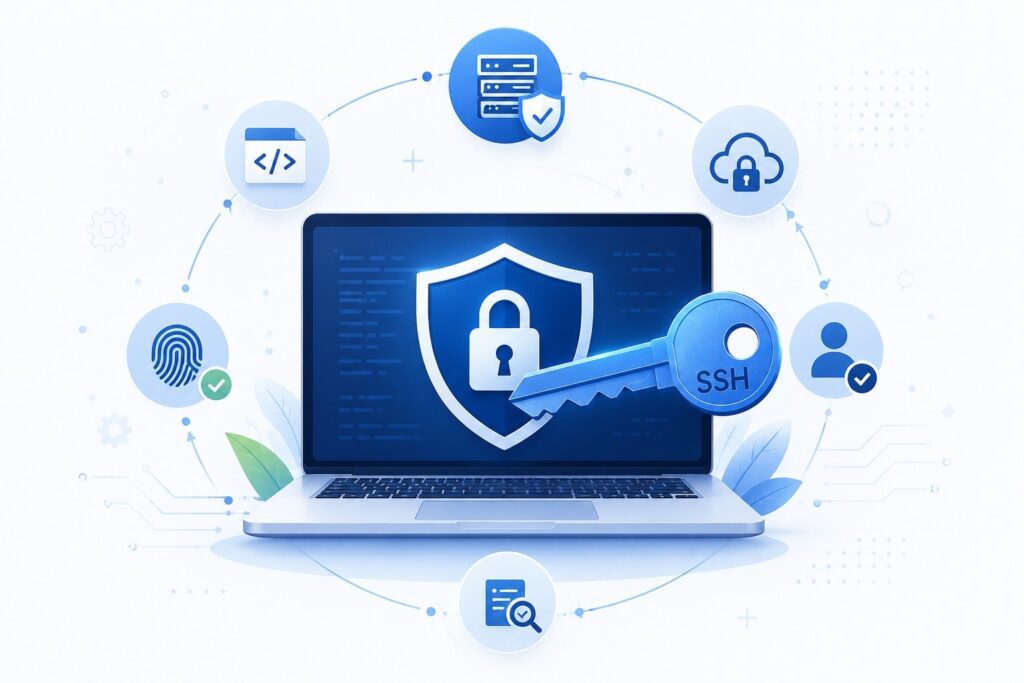
SSH keys often grant root-level or administrative access to critical systems. Unlike standard user accounts, these privileged credentials bypass many security controls. An attacker who obtains a valid SSH private key effectively becomes an authorized user from the server’s perspective. There is no password prompt. There is no MFA challenge by default. There is no session timeout. Access is immediate and persistent.
Credential Theft
Private keys stored on developer workstations, shared file systems, CI/CD pipeline configurations, and cloud storage buckets are prime targets for credential theft. Threat actors scan GitHub, GitLab, and public cloud storage for accidentally exposed private keys. Tools that automate this scanning are widely available and actively used in offensive security research and by criminal actors alike.
In enterprise environments, insider threats represent a parallel risk. Disgruntled employees, contractors with overly broad access, and departing staff who retain active keys after offboarding represent a significant attack vector that organizations consistently underestimate.
Lateral Movement
Once an attacker gains initial access to any system using a compromised SSH key, the real damage begins. SSH keys are commonly configured in trust relationships across server environments. A key that unlocks one development server may also unlock staging environments, database servers, and in poorly governed environments, production infrastructure.
This is lateral movement at its most efficient. The attacker hops from system to system using legitimate credentials, generating log entries that look identical to normal administrative activity. Without session monitoring, behavioral analytics, and strong identity governance, these movements go undetected for weeks or months.
Rogue SSH Keys
Rogue SSH keys are public keys that have been added to an authorized_keys file without proper authorization or documentation. Developers, contractors, and administrators sometimes add their keys directly to servers outside of any formal provisioning process. Over time, organizations lose track of who added what, and why.
These undocumented keys remain in place indefinitely. Employees leave. Contractors finish their engagements. Their keys stay. The access stays. This is the definition of a rogue credential and it represents one of the most common findings in SSH security assessments conducted by cybersecurity consulting teams.
Insider Threats
Insiders with legitimate SSH access represent a threat that technical controls alone cannot fully address. An administrator who copies a private key before leaving an organization retains access to every system that key unlocks until someone specifically removes it. Given that most enterprises cannot tell you with confidence how many SSH keys exist or where they live, this removal often never happens.
Privileged account security programs must account for the full SSH key lifecycle, including revocation and deprovisioning as a core workflow rather than an afterthought.
Misconfigured Servers
Default OpenSSH configurations are not hardened for enterprise environments. Common misconfigurations that attackers exploit include:
- Root login enabled via SSH (PermitRootLogin yes)
- Password authentication allowed alongside key authentication
- SSH running on default port 22, making it trivially discoverable
- Overly broad
AllowUsersorAllowGroupsdirectives - Absence of
MaxAuthTriesandLoginGraceTimelimits - Missing host key verification on clients
Linux SSH hardening requires systematic configuration auditing, not one-time setup.
Weak Governance
The root cause behind most SSH security failures is weak governance. When no one owns the SSH key management program, keys multiply without accountability. There are no standards for key strength, no enforcement of rotation schedules, no centralized inventory, and no process for removing access when it is no longer needed.
This is an organizational failure as much as a technical one, and it is exactly why SSH security must be integrated into a broader Identity and Access Management strategy.
Common SSH Security Risks
Understanding the specific risks that affect enterprise environments helps security teams prioritize remediation efforts.

Orphaned SSH Keys Keys associated with user accounts, service accounts, or systems that no longer exist or no longer require access. These keys sit in authorized_keys files indefinitely, providing persistent access with no legitimate owner.
Shared Administrator Accounts Multiple administrators sharing a single service account with one SSH key pair. When someone leaves, no one wants to rotate the key because it will break everyone else’s access. Accountability disappears entirely.
Stale Credentials SSH keys that have not been rotated in months or years. Even if the private key has not been compromised, extended validity periods increase exposure windows significantly.
Hardcoded SSH Keys Private keys embedded directly in application code, shell scripts, Ansible playbooks, Docker images, or Terraform configurations. These keys often end up in version control systems like GitHub or GitLab, where they can be discovered by anyone with repository access.
Excessive Privileges SSH keys that grant broader access than the user or system actually needs. The principle of least privilege is frequently violated in SSH environments because access expansion is easy and contraction requires effort.
Shadow IT Developers and system administrators provisioning SSH access outside of formal processes. These undocumented keys fall outside of security monitoring, audit coverage, and lifecycle management.
Cloud Misconfigurations AWS EC2 key pairs, Azure SSH access configurations, and Google Cloud SSH keys are frequently misconfigured. Public-facing instances with overly permissive network access and weak key management are a significant source of cloud infrastructure security incidents.
Unmonitored Service Accounts Machine-to-machine SSH connections used by automated systems, CI/CD pipelines, and scheduled jobs. These accounts often hold long-lived keys with elevated privileges and receive far less scrutiny than human user accounts.
How Hackers Exploit SSH Keys: Attack Scenarios
Understanding how attacks unfold helps organizations build more effective defenses. The following scenarios represent common attack patterns observed in enterprise environments.
Initial Access
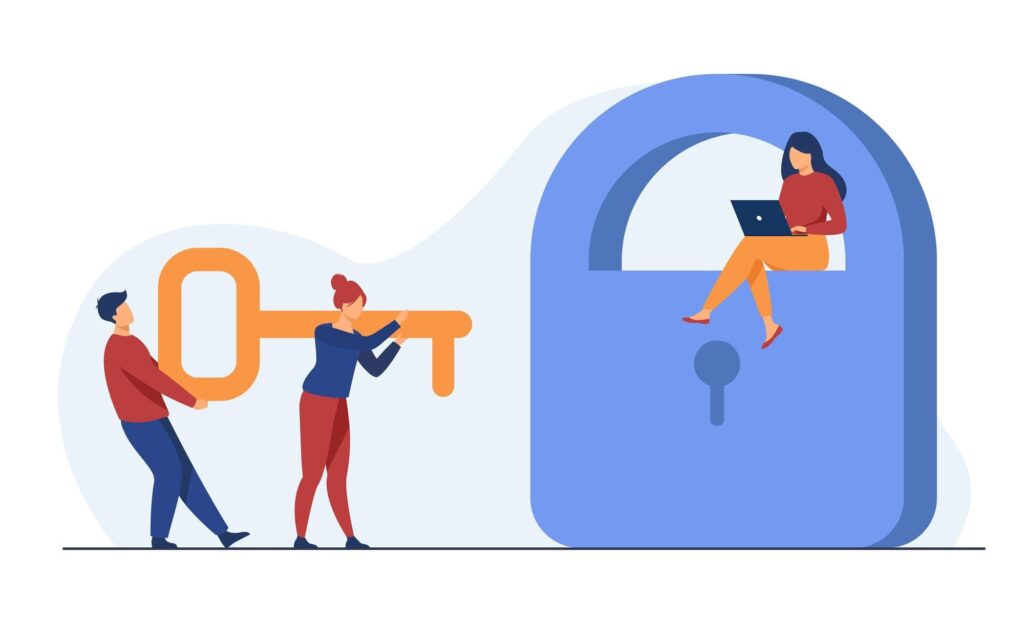
Attackers gain initial footholds through several methods. Phishing campaigns targeting developers and administrators can yield private keys stored on compromised workstations. Misconfigured cloud storage buckets containing backup files or configuration archives expose private keys to anyone who scans for them. Public code repositories are routinely searched for accidentally committed key material. Vulnerabilities in internet-facing applications can provide file system access where key material is stored.
Credential Harvesting
Once inside a single system, attackers enumerate the file system for SSH key material. Common locations include ~/.ssh/ directories, /etc/ssh/, application configuration directories, and CI/CD pipeline environment variables. Scripts that automate this enumeration are standard in attacker toolkits. Keys found during this phase are extracted and tested against other systems.
Privilege Escalation
An attacker who gains access to a low-privilege account searches for SSH keys belonging to higher-privilege accounts. Keys stored in shared directories, accessible via overly permissive file permissions, or cached in memory can be harvested and used to escalate privileges to root or administrator level.
Lateral Movement
With valid SSH keys in hand, attackers scan internal networks for accessible SSH servers. Because many enterprise environments maintain implicit trust between servers in the same network segment, a key obtained from one server may authenticate against dozens of others. This phase is particularly dangerous because the traffic appears legitimate to network monitoring tools.
Data Exfiltration
SSH provides encrypted channels that can be used to transfer data without triggering standard data loss prevention controls tuned for unencrypted traffic. SSH tunneling and SFTP are legitimate features that attackers repurpose for exfiltration, often blending into normal administrative traffic patterns.
Persistence Techniques
Attackers maintain persistence by adding their own public keys to authorized_keys files across multiple systems. Even if the initial compromise is discovered and remediated, the attacker retains access through these rogue keys unless every authorized_keys file in the environment is audited and cleaned. Without a comprehensive SSH key inventory, this cleanup rarely happens completely.
SSH Key Management Best Practices
A comprehensive SSH key management program addresses the full lifecycle from initial issuance through regular rotation to eventual revocation.
Discovery and Inventory
The first step is knowing what you have. Organizations must conduct automated SSH key discovery across all endpoints, cloud instances, containers, and on-premises servers to build a complete SSH key inventory. Manual approaches are insufficient at enterprise scale.
- Scan all systems for public keys in
authorized_keysfiles - Identify all private keys stored in user home directories, application directories, and configuration files
- Map trust relationships between key pairs and the systems they access
- Assign ownership to every key in the inventory
Ownership and Accountability
Every SSH key must have an identified owner, a documented business purpose, and an approved access scope. Keys without clear ownership are treated as rogue credentials and scheduled for removal.
Automated SSH Key Rotation
SSH key rotation should be automated and enforced by policy. Manual rotation processes are inconsistently executed and rarely audited effectively. Define maximum key age thresholds aligned with your compliance requirements and automate enforcement.
Certificate-Based Authentication
Migrate from long-lived static key pairs to short-lived SSH certificates issued by a trusted internal Certificate Authority. Certificates with 24-hour or 8-hour validity windows dramatically reduce the exposure window for any compromised credential.
Multi-Factor Authentication
While SSH key authentication is significantly stronger than passwords, combining it with MFA adds a critical additional verification layer. Solutions that enforce MFA before SSH session establishment reduce the risk from stolen private keys.
Least Privilege Access
SSH access grants should follow the principle of least privilege. Administrators should have access only to the systems their role requires, at the privilege level those tasks demand. Just-in-Time (JIT) access provisioning grants temporary elevated access that expires automatically, eliminating persistent privileged sessions.
Continuous Monitoring and Session Recording
All SSH sessions to critical systems should be monitored and recorded. Session recording provides forensic evidence after incidents and acts as a deterrent against insider misuse. Behavioral analytics that baseline normal SSH activity and alert on anomalies improve threat detection significantly.
Logging and Auditing
SSH access logs must be collected, centralized, and retained according to compliance requirements. Login attempts, session establishment, commands executed, and session termination events should all feed into your security monitoring platform. Regular SSH key audits verify that the inventory remains current and that no unauthorized keys have been added.
Zero Trust SSH Implementation
Zero Trust architecture applied to SSH access removes implicit trust from network location. Every SSH connection request is authenticated, authorized, and continuously validated regardless of whether it originates inside or outside the corporate network. This approach assumes breach and minimizes blast radius when credentials are compromised.
Enterprise SSH Security Checklist:
- Complete SSH key discovery across all environments
- Centralized SSH key inventory with ownership records
- Automated key rotation policy with enforcement
- Certificate-based authentication deployed for critical systems
- MFA integrated with SSH authentication
- Least privilege access enforced for all SSH grants
- JIT access for privileged administrative sessions
- Session monitoring and recording on production systems
- Centralized log collection and SIEM integration
- Regular SSH key audits on defined schedule
- Deprovisioning workflow for departing employees and contractors
- Zero Trust policy applied to SSH access requests
SSH Key Security vs Password Authentication
Understanding the tradeoffs between SSH key-based and password-based authentication helps organizations make informed decisions about their privileged access strategy.
| Factor | SSH Key Authentication | Password Authentication |
|---|---|---|
| Security Strength | High (cryptographic) | Low to Medium |
| Brute Force Resistance | Extremely strong | Vulnerable without lockout |
| Phishing Resistance | Strong | Highly vulnerable |
| Compliance Readiness | Preferred by NIST, PCI DSS | Often requires compensating controls |
| Scalability | Requires governance program | Easy but risky at scale |
| Automation Support | Excellent for machine access | Poor for machine identities |
| Cost | Low direct cost, high governance cost | Low direct cost |
| User Experience | Seamless once configured | Familiar but friction-prone |
| Enterprise Readiness | High with proper governance | Moderate |
| Attack Resistance | High against external, lower for insider | Low against both |
| Auditability | Requires additional tooling | Native in most systems |
| Revocation Speed | Slow without automation | Fast (password reset) |
The conclusion from this comparison is not that SSH keys are inherently safer. They are safer from external brute force attacks. But the governance burden they introduce means organizations that deploy SSH keys without a proper management program may actually have a weaker overall security posture than those using well-managed password authentication with MFA.
The optimal approach for enterprise environments combines SSH key or certificate-based authentication with centralized PAM controls, session monitoring, and Zero Trust access policies.
Integrating SSH Security with IAM and PAM

Identity Governance and Administration
Identity Governance and Administration (IGA) programs provide the organizational framework for managing who has access to what. Integrating SSH key lifecycle management into your IGA platform means SSH access grants are subject to the same provisioning, approval, and review workflows as all other access types.
Access reviews that include SSH keys ensure that administrators periodically certify that existing key grants are still appropriate. This is the mechanism that catches orphaned keys from departed employees and contractors before they become exploited vulnerabilities.
Privileged Access Management
PAM platforms like CyberArk, Delinea, and BeyondTrust are designed specifically to govern privileged credentials, and SSH keys are privileged credentials. Integrating SSH management with PAM provides:
- Centralized vault for SSH private keys
- Automated key rotation on a configurable schedule
- Session proxy capabilities that interpose between the user and the target system
- Session recording and monitoring
- Just-in-Time access provisioning for time-limited SSH sessions
- Full audit trail of all privileged access activity
Organizations that manage SSH keys through a PAM platform dramatically reduce the risk of orphaned credentials, insider threats, and persistent unauthorized access.
Role-Based Access Control
RBAC applied to SSH access means access grants are tied to defined roles rather than individual user accounts. When someone changes roles or leaves the organization, their role assignment changes and SSH access is adjusted or revoked automatically, rather than requiring manual intervention across potentially hundreds of servers.
Access Lifecycle Management
The SSH key lifecycle must be integrated with your broader identity lifecycle management processes:
- Onboarding: SSH keys provisioned according to role, with documented ownership
- Role changes: Access scope updated to reflect new responsibilities
- Offboarding: All SSH keys associated with the departing identity revoked within defined SLA
- Contractor management: Time-limited SSH access with automatic expiration
SSH Security in Cloud and DevSecOps Environments
AWS SSH Security
AWS provides EC2 key pairs as the native SSH access mechanism for Linux instances. However, the AWS key pair model has significant governance limitations. Keys are generated once and stored wherever the administrator saves them. AWS does not rotate them. AWS does not audit their usage. Organizations running large AWS environments should replace native key pair management with a centralized SSH key management solution integrated with AWS IAM roles and AWS Systems Manager Session Manager, which eliminates the need for direct SSH access to many workloads entirely.
Azure SSH Access
Azure virtual machines support SSH key authentication for Linux workloads. Microsoft Entra ID (formerly Azure Active Directory) integration with SSH access provides a stronger governance foundation. Azure Bastion eliminates public SSH exposure by providing browser-based access without exposing port 22 to the internet.
Google Cloud SSH
Google Cloud’s OS Login feature integrates SSH access with Google IAM, providing centralized access control for GCP virtual machines. SSH keys are bound to Google accounts rather than instance metadata, which simplifies governance at scale.
Kubernetes Security
Kubernetes environments add machine identity complexity. Worker nodes require SSH access for administration. Container images may embed SSH keys for inter-service communication. Service accounts in Kubernetes use credentials that behave similarly to SSH keys in terms of privilege and persistence. Kubernetes security requires treating machine identities as first-class citizens in your identity security program.
Container Security and DevSecOps
Container images built with embedded SSH private keys are a persistent problem in DevSecOps environments. Secrets scanning in CI/CD pipelines using tools integrated with Jenkins, GitHub Actions, or GitLab CI can detect private keys before they are committed to repositories or baked into images. Infrastructure as Code deployments via Terraform and Ansible should use dynamic credential injection from secrets management platforms like HashiCorp Vault rather than static SSH keys.
Machine Identities at Scale
The ratio of machine identities to human identities in modern enterprise environments is often 10:1 or higher. Every server, container, pipeline job, and automated process that authenticates via SSH represents a machine identity. Securing machine identities requires the same lifecycle management discipline applied to human user accounts, including automated rotation, least privilege access, and continuous monitoring.
Compliance Requirements for SSH Key Security

NIST Guidelines
NIST Special Publication 800-53 and NIST SP 800-63B provide guidance directly relevant to SSH key management. Controls around identification and authentication (IA family), access control (AC family), and audit and accountability (AU family) all apply to SSH environments. NIST’s Zero Trust Architecture guidance (SP 800-207) explicitly addresses the risks of implicitly trusted network connections, which is directly applicable to SSH access models.
PCI DSS
The Payment Card Industry Data Security Standard requires organizations to manage authentication mechanisms carefully. PCI DSS Requirement 8 covers password and authentication policies. Organizations subject to PCI DSS must demonstrate that SSH keys used to access cardholder data environments are inventoried, rotated, and governed according to defined policies. A missing SSH key audit trail can result in compliance failures during QSA assessments.
HIPAA
Healthcare organizations using SSH to access systems containing Protected Health Information (PHI) must demonstrate appropriate access controls and audit logging under HIPAA’s Security Rule. SSH session logs and access audit trails contribute to HIPAA compliance evidence.
ISO 27001
ISO 27001 Annex A controls covering access management, cryptographic controls, and operations security all intersect with SSH key governance. Organizations pursuing ISO 27001 certification should include SSH key management in their Information Security Management System (ISMS) scope.
SOC 2
SOC 2 Type II audits evaluate the operating effectiveness of controls over time. SSH key provisioning, rotation, and deprovisioning processes must produce consistent, auditable evidence to support SOC 2 reporting. Automated SSH governance significantly simplifies evidence collection.
CIS Controls
The Center for Internet Security (CIS) Controls, specifically Control 5 (Account Management) and Control 6 (Access Control Management), directly address SSH key governance requirements. CIS Benchmark configurations for Linux systems include specific OpenSSH hardening recommendations.
Emerging Trends in SSH Security

SSH Certificates and Short-Lived Credentials
The shift from long-lived SSH key pairs to short-lived certificates represents the most significant architectural improvement available to most organizations today. When certificates expire in hours rather than years, the damage from credential theft is bounded by time. This trend is accelerating as platforms like HashiCorp Vault make certificate-based SSH access operationally practical at enterprise scale.
Passwordless Authentication
Passwordless authentication architectures extend beyond just SSH. Organizations integrating SSH with broader passwordless strategies eliminate password-based fallback methods entirely, reducing the attack surface while improving user experience for administrators accessing Linux infrastructure.
AI-Powered Identity Security
Artificial intelligence and machine learning are increasingly applied to identity security, including SSH access anomaly detection. Behavioral baselines that flag unusual SSH access patterns, unexpected lateral movement, or off-hours access to sensitive systems improve threat detection without requiring manual rule tuning.
Machine Identity Management
Recognition that machine identities represent the largest and fastest-growing segment of privileged access has elevated machine identity management as a distinct security discipline. SSH keys assigned to service accounts, automation tools, and CI/CD pipelines require the same governance rigor as human privileged accounts.
Continuous Access Evaluation
Zero Trust implementations increasingly move toward continuous access evaluation, where authorization decisions are made not just at session establishment but throughout the session’s lifetime. For SSH, this can mean session termination when risk signals change, even mid-session.
Automated SSH Governance
The scale of modern enterprise SSH environments makes manual governance untenable. Automated discovery, rotation, and deprovisioning platforms that integrate with existing PAM, IGA, and SIEM solutions are becoming a baseline requirement for organizations with mature security programs.
Why Organizations Trust Avancer Corporation for SSH Security
Managing SSH key security effectively requires more than deploying a tool. It requires a strategic program that integrates SSH governance into your broader identity security architecture, aligns with compliance requirements, and scales with your infrastructure.
Avancer Corporation brings deep expertise in Identity and Access Management, Privileged Access Management, Identity Governance and Administration, and Zero Trust architecture to help organizations build and operate secure SSH environments. Our consultants have implemented SSH security programs for enterprise clients across financial services, healthcare, manufacturing, and technology sectors.
What Avancer Corporation delivers for SSH security:
SSH Key Discovery and Inventory: We use automated tooling to conduct comprehensive SSH key discovery across on-premises servers, cloud environments, and hybrid infrastructure. Organizations are often surprised by how many keys exist and how few have documented owners.
Orphaned Credential Elimination: We identify and remove orphaned SSH keys associated with departed users, decommissioned systems, and expired access grants, closing access paths that organizations did not know were open.
Privileged Identity Security: Our PAM consulting practice integrates SSH key management into enterprise PAM platforms including CyberArk, Delinea, and BeyondTrust, providing centralized governance, automated rotation, and session monitoring for SSH privileged access.
Enterprise SSH Governance: We design and implement SSH key governance programs that include lifecycle management policies, ownership assignment processes, rotation schedules, and audit frameworks aligned with NIST, PCI DSS, HIPAA, ISO 27001, and SOC 2 requirements.
Automated SSH Key Rotation: We implement automated rotation workflows that eliminate the operational burden of manual key management while ensuring keys are cycled according to policy, consistently and auditably.
IAM and PAM Integration: Our team connects SSH governance to your existing IAM and PAM infrastructure, ensuring that SSH access provisioning, review, and deprovisioning follow the same controlled workflows as all other privileged access.
Insider Threat Reduction: By establishing clear ownership, enforcing least privilege, and implementing continuous monitoring, Avancer Corporation helps organizations detect and respond to insider threats involving SSH access before they escalate.
Zero Trust SSH Architecture: We design Zero Trust access models for SSH environments that eliminate implicit trust from network topology, enforce explicit authorization for every connection, and continuously validate access throughout each session.
Cloud Identity Security: For organizations running workloads on AWS, Azure, and Google Cloud, our cloud identity security practice ensures that SSH access to cloud infrastructure is governed by the same standards applied to on-premises environments.
Organizations working with Avancer Corporation leave with a SSH security program that is measurable, auditable, and sustainable, not a one-time cleanup that reverts to chaos within six months.
Conclusion:
SSH keys power the administrative access that keeps enterprise infrastructure running. They are efficient, cryptographically strong, and deeply integrated into Linux, Unix, cloud, and DevOps environments that modern organizations depend on.
But cryptographic strength is only one dimension of security. The other dimension is governance, and that is where most enterprise SSH programs fall short.
Orphaned keys, hardcoded credentials, shared service accounts, rogue entries in authorized_keys files, and unmonitored machine-to-machine connections represent an attack surface that grows with every deployment, every new team member, every cloud resource, and every CI/CD pipeline addition. Without a formal SSH key management program, organizations are running privileged access infrastructure that nobody truly controls.
The solution is not to abandon SSH. It is to govern it with the same rigor applied to any other privileged credential. That means integrating SSH security into your IAM and PAM programs, applying Zero Trust principles to every SSH access request, automating key lifecycle management, and continuously monitoring SSH activity for behavioral anomalies.
Compliance frameworks from NIST and PCI DSS to HIPAA, ISO 27001, and SOC 2 recognize SSH governance as a control requirement, not a nice-to-have. The organizations that satisfy auditors with evidence of a well-run SSH program are the same organizations that prevent the lateral movement attacks and insider threats that make security incident headlines.
Avancer Corporation helps organizations build SSH security programs that are technically sound, operationally sustainable, and compliance-aligned. Whether you are starting with an SSH key audit to understand your current exposure or implementing a full Zero Trust SSH architecture, our consultants bring the enterprise experience to do it right.
Frequently Asked Questions:
What are SSH keys?
SSH keys are cryptographic key pairs used to authenticate users and systems to SSH servers without requiring a password. Each pair consists of a public key placed on the server and a private key retained by the client. The SSH protocol uses these keys to establish secure, encrypted connections.
How do SSH keys work?
SSH key authentication works through an asymmetric cryptographic challenge-response process. When a client connects to an SSH server, the server issues a challenge encrypted with the client’s stored public key. The client decrypts it using its private key and returns a response. The server verifies this response, confirming the client holds the legitimate private key, and grants access.
Why are SSH keys considered a security risk?
SSH keys are a security risk primarily because of governance failures rather than cryptographic weaknesses. Keys frequently accumulate without oversight, are never rotated, lack clear ownership, and persist in file systems and code repositories long after the access they grant is no longer authorized. A single exposed private key can provide persistent, unmonitored access to critical systems.
How do hackers exploit SSH keys?
Attackers exploit SSH keys through multiple methods: scanning code repositories and cloud storage for accidentally exposed private keys, harvesting keys from compromised workstations, enumerating key material on systems after gaining initial access, exploiting misconfigured SSH server settings, and adding rogue public keys to authorized_keys files to maintain persistence.
What is SSH key management?
SSH key management encompasses the policies, processes, and tools used to govern SSH key pairs throughout their lifecycle. This includes discovery, inventory, ownership assignment, rotation, access reviews, and deprovisioning. Effective SSH key management integrates with IAM and PAM platforms to provide centralized visibility and control over all SSH credentials.
How often should SSH keys be rotated?
The appropriate SSH key rotation frequency depends on risk tolerance and compliance requirements, but security best practices recommend rotating SSH keys at minimum annually, with higher-sensitivity environments rotating quarterly or monthly. Adopting SSH certificate-based authentication with short validity periods (hours to days) effectively solves the rotation problem by making long-lived static keys unnecessary.
What are orphaned SSH keys?
Orphaned SSH keys are public key entries in authorized_keys files whose corresponding private key holder no longer has a legitimate reason to access the system. Common causes include employee departures, contractor engagements that ended, and system decommissioning. Orphaned keys are dangerous because they provide persistent access with no accountable owner.
How does SSH integrate with IAM?
SSH integration with IAM means that SSH access provisioning, modification, and deprovisioning follow the same identity lifecycle management workflows applied to all other access types. Users are granted SSH access based on their role and business need, access reviews periodically certify ongoing appropriateness, and departures trigger automatic SSH credential revocation.
What is the role of PAM in SSH security?
PAM platforms govern privileged access, and SSH keys are privileged credentials. PAM solutions provide centralized SSH key vaulting, automated rotation, session proxying and recording, and Just-in-Time access provisioning. Integrating SSH management with PAM platforms like CyberArk, Delinea, or BeyondTrust provides enterprise-grade control over privileged SSH access.
What is Zero Trust SSH access?
Zero Trust SSH access means that no connection is trusted by default based on network location or previous authentication. Every SSH access request is explicitly authenticated and authorized based on identity, device posture, and contextual signals. Access is granted with minimum necessary privilege for a defined time period, and sessions are continuously monitored throughout their duration.
